
The "best" browser for Windows 11
We break down the top options for privacy, speed, and customization so you can pick the right one.
COMPUTER
Posted by Tae K.
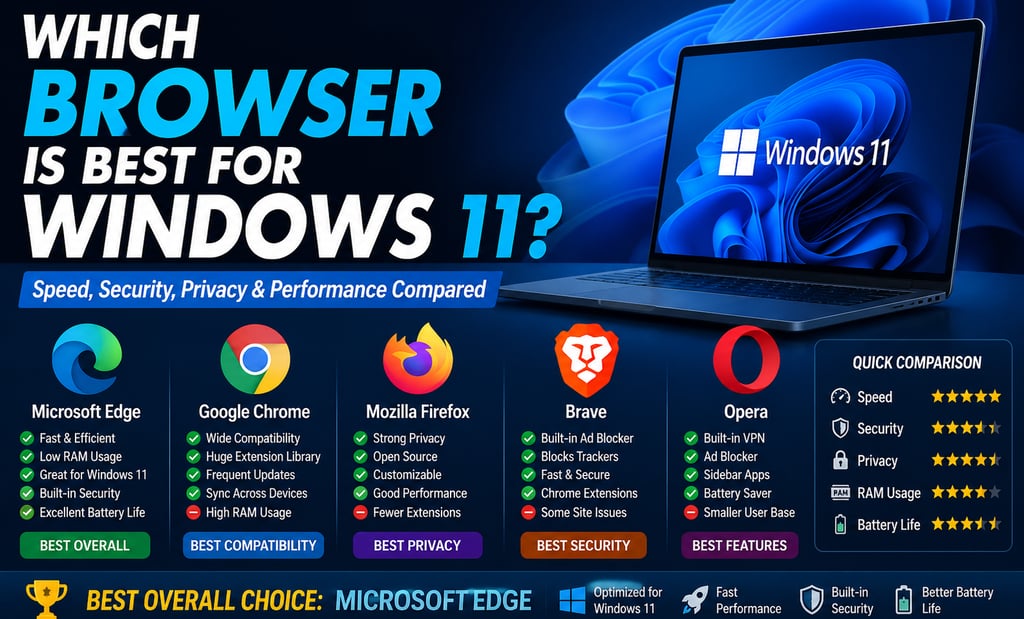
The "best" browser for Windows 11 depends heavily on your specific needs, such as whether you prioritize system integration, privacy, or customization. Here are the top recommendations for 2026:
1. Microsoft Edge (Best Overall for Most Windows 11 Users)
Best for: Everyday users, students, seniors, and business professionals
Pros
Pre-installed on Windows 11
Fast startup and excellent performance
Lower RAM and battery usage than Chrome
Built-in Microsoft Defender SmartScreen protection
Vertical tabs
Sleeping Tabs save memory
Built-in PDF editor
Collections for research
Excellent compatibility with Microsoft 365
Cons
Some users dislike Microsoft's promotional features.
Privacy settings should be reviewed after installation.
Overall Rating: ⭐⭐⭐⭐⭐ (9.7/10)
2. Google Chrome (Best Compatibility)
Best for: Users heavily invested in Google's ecosystem
Pros
Largest extension library
Excellent website compatibility
Syncs bookmarks, passwords, and history across devices
Great developer tools
Frequent updates
Cons
Uses more RAM
Can slow older computers
Higher battery consumption on laptops
Overall Rating: ⭐⭐⭐⭐⭐ (9.5/10)
3. Mozilla Firefox (Best Privacy)
Best for: Privacy-conscious users
Pros
Strong privacy protection
Open-source
Excellent tracking protection
Highly customizable
Good extension support
Cons
Slightly slower on some complex websites
Smaller extension library than Chrome
Overall Rating: ⭐⭐⭐⭐☆ (9.2/10)
4. Brave (Best for Security & Privacy)
Best for: Users who want maximum privacy without sacrificing speed
Pros
Built-in ad blocker
Blocks trackers automatically
Faster page loading
Very secure
Chromium-based (works with Chrome extensions)
Cons
Crypto features may be unnecessary for many users
Some websites require disabling Shields
Overall Rating: ⭐⭐⭐⭐⭐ (9.4/10)
5. Opera
Best for: Users who like built-in tools
Pros
Free VPN
Built-in ad blocker
Sidebar apps (WhatsApp, Messenger, Discord)
AI features
Battery Saver mode
Cons
Smaller market share
Some privacy concerns compared to Firefox or Brave
Overall Rating: ⭐⭐⭐⭐☆ (8.8/10)
Speed Comparison
Browser Speed RAM Usage Battery Security Microsoft Edge ⭐⭐⭐⭐⭐ ⭐⭐⭐⭐⭐ ⭐⭐⭐⭐⭐ ⭐⭐⭐⭐⭐ GoogleChrome ⭐⭐⭐⭐⭐ ⭐⭐⭐ ⭐⭐⭐ ⭐⭐⭐⭐☆ Brave ⭐⭐⭐⭐⭐ ⭐⭐⭐⭐☆ ⭐⭐⭐⭐☆ ⭐⭐⭐⭐⭐ Firefox ⭐⭐⭐⭐☆ ⭐⭐⭐⭐☆ ⭐⭐⭐⭐☆ ⭐⭐⭐⭐⭐ Opera ⭐⭐⭐⭐☆ ⭐⭐⭐⭐☆ ⭐⭐⭐⭐☆ ⭐⭐⭐⭐☆
Top Recommendations at a Glance
Browser Best For Why It’s Recommended
Microsoft Edge Windows Integration & AI Best performance optimization for Windows 11, deep integration with Copilot, and features like "Sleeping Tabs" to save resources.
Google Chrome Compatibility & Ease The most popular choice, offering excellent stability, a massive library of extensions, and fast performance.
Brave Privacy & Ad-Blocking Offers a fast, ad-free experience out of the box by blocking trackers and ads automatically.
Mozilla Firefox Customization & Privacy An open-source, non-Chromium alternative that gives you more control over your data and browsing experience.
Vivaldi Advanced Power Users Highly customizable interface with unique features like vertical tab stacking, built-in productivity tools, and deep layout control.
Which Browser Should You Choose?
Choose Microsoft Edge if you:
Use Windows 11 daily
Want the best battery life
Prefer the fastest browser for most tasks
Use Microsoft Office or OneDrive
Want minimal setup
Choose Google Chrome if you:
Use Gmail, Google Drive, and Google Docs
Need the widest extension support
Already use Chrome on multiple devices
Choose Firefox if you:
Value privacy
Prefer open-source software
Want strong tracking protection
Choose Brave if you:
Want a fast browser with built-in ad blocking
Care about online privacy
Don't want to install extra privacy extensions
Choose Opera if you:
Like having a free VPN
Want built-in messaging apps
Prefer an all-in-one browsing experience
My Recommendation
For most Windows 11 users, Microsoft Edge is the best choice. Since it's optimized by Microsoft for Windows 11, it typically offers the best balance of speed, memory efficiency, battery life, and security.
If you're deeply invested in Google's services, Google Chrome is still an excellent option. If privacy is your top priority, Brave or Firefox are outstanding alternatives.
Winner by category:
Best Overall: Microsoft Edge
Best Performance: Microsoft Edge
Best Privacy: Brave
Best Compatibility: Google Chrome
Best Battery Life: Microsoft Edge
Contact Us
Get in touch with us
Phone Number:
info@primetechcarelv.com
© 2025. All rights reserved.
Address:
Email: